Creating a New Post
Once your content is ready in Google Docs, open the Docs to WP Pro extension and switch to the Publish tab. The sidebar will display all available publishing options.
Before publishing, ensure your WordPress site is configured. See Add New Site.
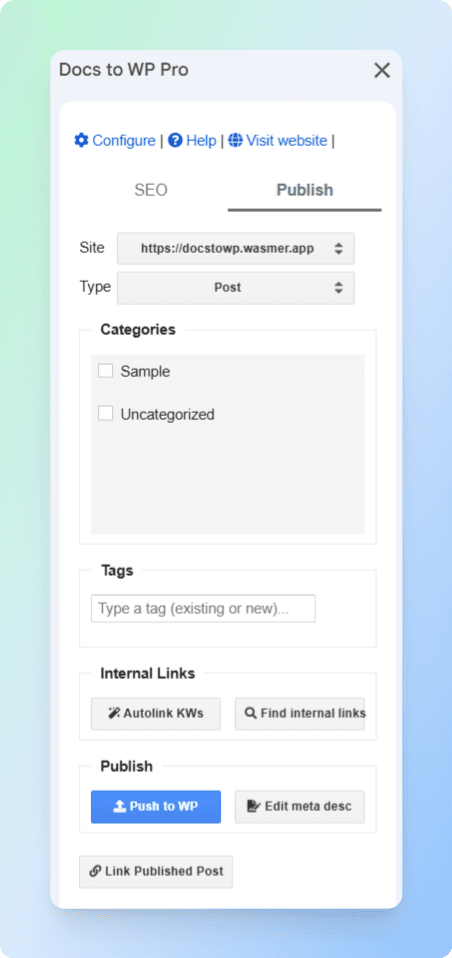
1. Select Your Site
Use the Site dropdown to choose the connected WordPress site where you want to publish.
2. Choose the Post Type
In the Type dropdown, you’ll see several options:
-
Post → Used for blog articles, updates, or any time-based content.
-
Page → Used for static content like About, Contact, or landing pages.
-
wp_font_face / wp_font_family / wp_global_styles → These are WordPress system post types created automatically for managing theme styles and font settings. They are not meant for publishing content and should be ignored.
For publishing content, choose either Post or Page.
3. Assign Categories
Check one or more categories to classify your post. Categories help organize your content and improve SEO.
4. Add Tags
In the Tags field, type keywords or phrases. Press Enter to add each tag.
Example tags:
WordPress, Tutorial, Docs to WP Pro
5. Internal Links
Enhance SEO by linking to other posts/pages:
-
Autolink KWs – Automatically link defined keywords to specific URLs.
-
Find internal links – Search your WordPress site for related posts and insert them.
6. Publish the Post
-
Click Push to WP to publish your content.
-
To edit SEO metadata before publishing, click Edit meta desc.
-
Slug – Customize the post URL ending.
-
Focus Keyword – Enter your main keyword for SEO targeting.
-
Meta Description – Write a short, compelling summary (150–160 characters recommended).
-
-
Click Save and Close to apply changes.
7. Link to the Published Post
After publishing, click Link Published Post to view the live version of your content in WordPress.
Tips
-
Configure your default settings beforehand to save time when publishing.
-
Always include at least one image with alt text for better SEO.
-
Use categories + tags consistently to improve site navigation.