Editing Metadata
Metadata helps search engines and users understand what your post is about before they click. With Docs to WP Pro, you can edit your post’s metadata directly from Google Docs, ensuring that your content is well-optimized for SEO.
Why Metadata Matters
-
Slug – Defines the custom URL of your post. A clean, keyword-friendly slug helps both SEO and readability.
-
Focus Keyword – The main keyword you want to rank for. It should appear in your title, content, and meta description.
-
Meta Description – A short summary (150–160 characters) that appears below your post title in search results. A strong description improves click-through rates.
Editing Metadata in Docs to WP Pro
-
In your Google Doc, go to Extensions → Docs to WordPress Pro → Push to WordPress→ SEO → Edit Meta.
-
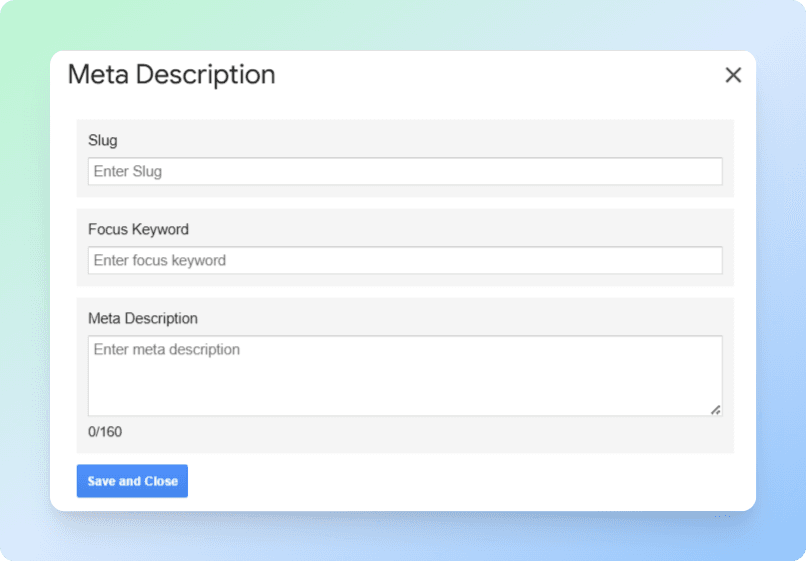
A pop-up will appear with the following fields:
-
Slug – Enter a short, descriptive URL ending (e.g.,
/seo-tips). -
Focus Keyword – Add the main keyword or phrase you want to target.
-
Meta Description – Write a concise summary of your content.
-
-
Once finished, click Save and Close.
Example: Meta Description Editor
Best Practices
-
Keep your meta description between 150–160 characters.
-
Place your focus keyword naturally in the description.
-
Write in a way that encourages clicks (use action words or highlight benefits).
-
Keep slugs short and simple, using hyphens (
-) instead of spaces. -
Use only one focus keyword per post for clarity.